Solutions

Cut the suite by need, role or industry.

The same core platform, seen through three operational lenses. Every entry says what fits today, and what does not.

Solutions

Pick a lens. Read what fits.

Needs are the strongest cut, because the product was built around the jobs an AP team has to do. Roles show who gets what. Industries describe a procurement pattern and say plainly which capabilities fit it today.

NeedPartial

Exceptions with a cause and an owner

The Pain PointAn invoice stops and nobody can say why. Someone forwards an email and the payment waits.
  • The invoice is held with its reason and what is missing.
  • The record names the role who has to act.
  • When the missing goods receipt is posted, the hold releases itself and the invoice moves on.

Plain-language reasons are being rolled out to every kind of hold.

Modules:MatchReceive
NeedLive

Invoices with no PO

The Pain PointServices, utilities and one-off bills arrive without a PO and get coded by hand, differently each time.
  • The platform suggests the GL account, cost centre and tax code from how this supplier was coded before.
  • Every suggestion shows its confidence and its reasons, and the budget is checked.
  • A person accepts or corrects each coding. A correction needs a reason. The approver comes from the approval bands.

Ranked PO candidates for invoices that should have had a PO are on the roadmap.

Modules:MatchQualifyPay
NeedLive

Duplicates and payment risk

The Pain PointThe same invoice arrives twice, by email and by scan, and gets paid twice.
  • The same invoice number arriving through another channel blocks approval.
  • The same supplier and amount inside a window raises a warning.
  • An import invoice that has already been settled locks its AP copy, so it can never be paid twice.
  • A changed bank account is flagged. Payment approval is its own gate.

A changed bank account is flagged as advice today. It does not stop a transition on its own.

Modules:MatchPayAlways on
NeedNew

Tax and withholding

The Pain PointTax is worked out on a side spreadsheet, and the net payable is not what approval saw.
  • One calculation: gross, sales tax per line, income-tax withholding and sales-tax withholding, net payable.
  • Rates come from a versioned, dated rules table. Every result records which version it used.
  • The supplier's tax profile, such as filer status and province, feeds the calculation.

Rules for Pakistan are in place and other jurisdictions are on the roadmap. The calculation runs today. The review panel and the withholding certificate are being finished, and your finance team signs off the rules before go-live.

Modules:PayMatch
NeedLive

Imports and letters of credit

The Pain PointImports are paid through the bank or a letter of credit, then the invoice turns up in AP as if it were unpaid.
  • The invoice is reconciled with the trade documents and the settlement.
  • A balanced journal is proposed for a person to approve.
  • The AP copy of a settled invoice is locked and linked, never paid.
Modules:PayMatch
NeedPartial

Expense and branch payments

The Pain PointOperating-expense and branch payments run on paper trails and phone calls, and nobody can show which control was taken by whom.
  • A payment request is checked against the budget before it moves on.
  • Each control is taken by a person, and the record keeps what they confirmed.
  • Payment documents are produced, and the AP entry is booked once the approvals are in.

Controls and documents follow a payment manual, so a new organisation's version is set up during a pilot.

Modules:PayRequestAlways on
NeedLive

Your ERP, unchanged

The Pain PointAnother system that wants to replace the ERP is a project nobody has budget for.
  • Adapters for Odoo, SAP Business One, Microsoft Dynamics and PostgreSQL read your suppliers, POs, receipts and invoices.
  • Anything written back is a draft that a person approves.
  • No ERP at all? ProcureVerse's own PostgreSQL record can stand in.

SAP S/4HANA, Oracle Fusion and ERPNext are on the roadmap.

Modules:Always onOrder
NeedLive

Approvals an auditor can follow

The Pain PointApprovals live in email threads, and nobody can show who decided what, or why.
  • Four-eyes approvals under segregation of duties.
  • Every correction and every decision is stored with who, when and why.
  • A tamper-evident audit trail: change an old entry and the chain stops matching.

No certifications are claimed on this site. The controls are described so you can test them.

Modules:RequestPayAlways on
NeedLive

Spend and supplier visibility

The Pain PointSpend is reported a month late, from three exports, and off-contract buying is found by accident.
  • Live spend by category, supplier and cost centre, with off-contract spend and concentration flagged.
  • Supplier scorecards from real inspection, delivery, price and response signals.
  • A cash projection for accounts payable and a spend forecast by category.

Scores come from your own records. There are no invented composite ratings.

Modules:PaySource
Procurement leaders

See where work is waiting before delays compound.

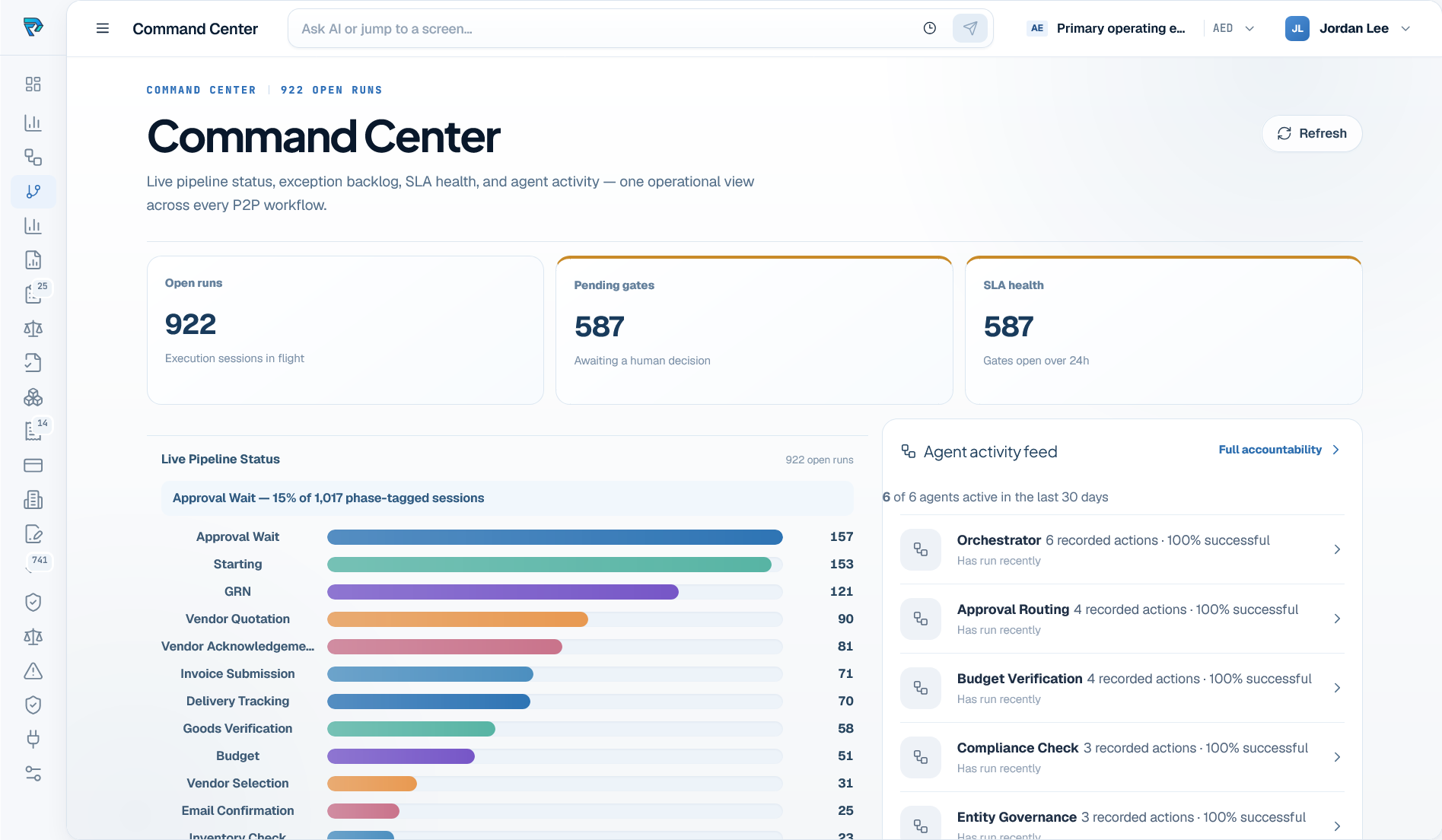
Command Center brings live pipeline status, exception backlog, SLA health, and agent activity into one operating view across procure-to-pay.

  • See open work and pending human decisions in one operational view.
  • Find which pipeline stages are accumulating volume or approaching SLA risk.
  • Review agent activity beside the work it is supporting.
app.procureverse.ai/command-center
ProcureVerse Command Center showing open runs, pending gates, SLA health, and agent activity
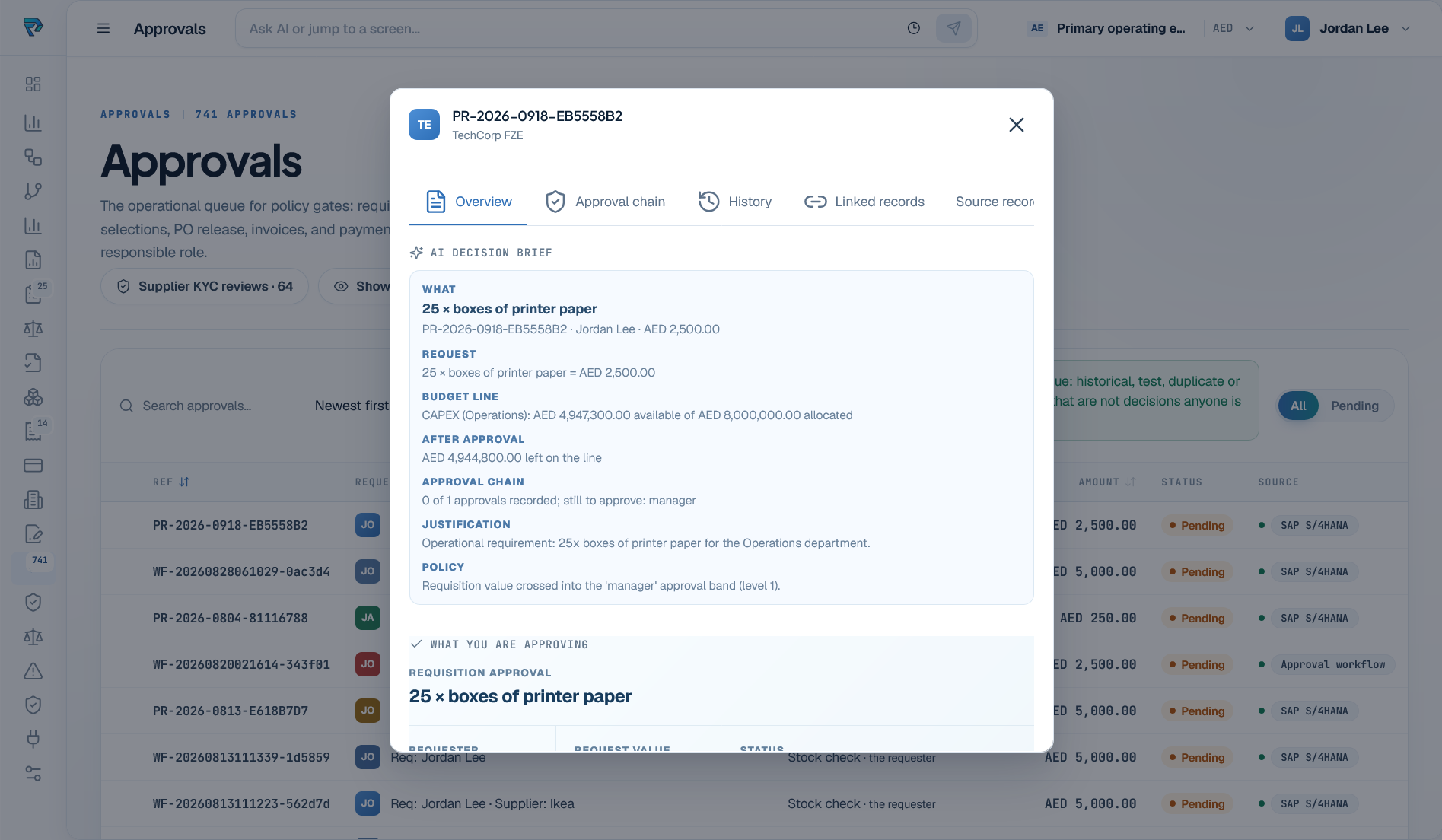
app.procureverse.ai/approvals
ProcureVerse approval decision brief with request, budget, approval chain, justification, and policy
Buyers & approvers

Decide with the request, budget, and policy in view.

The decision brief organizes what is being requested, why it is needed, which budget applies, and who must approve it before the work moves forward.

  • Review the request, value, requester, and available budget together.
  • See the approval chain and the policy that applies to the decision.
  • Keep the decision brief attached to the underlying procurement record.
Finance & AP

Match the evidence before payment moves.

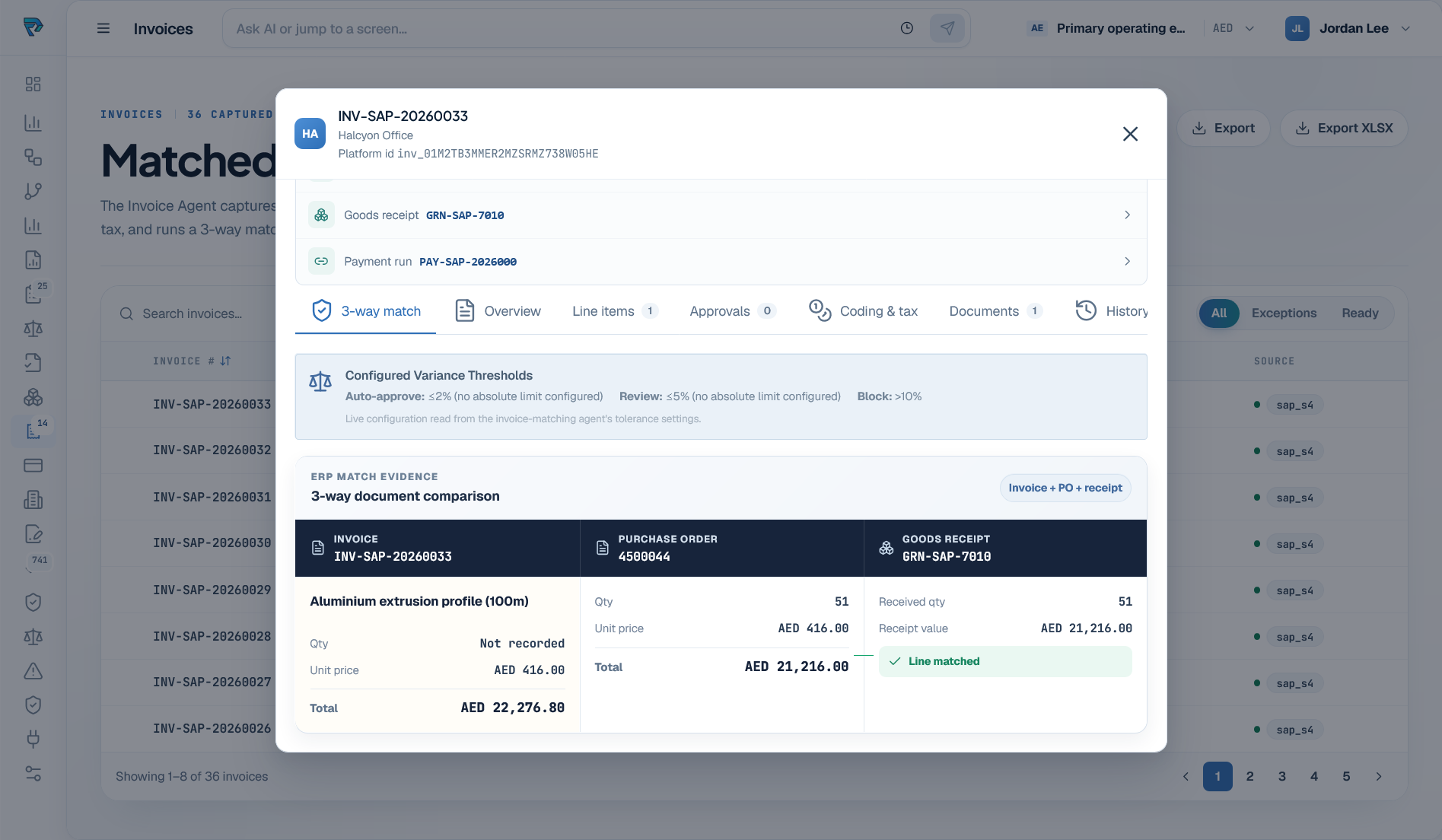
Finance can inspect the invoice, order, receipt, and configured thresholds from the same record before resolving an exception or preparing the item for release.

  • Compare the invoice, purchase order, and goods receipt line by line.
  • Apply visible variance thresholds before an item can move forward.
  • Route mismatches for review while preserving the connected evidence.
app.procureverse.ai/invoices
ProcureVerse invoice three-way match comparing the invoice, purchase order, and goods receipt
IT, risk & audit

Connect systems without surrendering control.

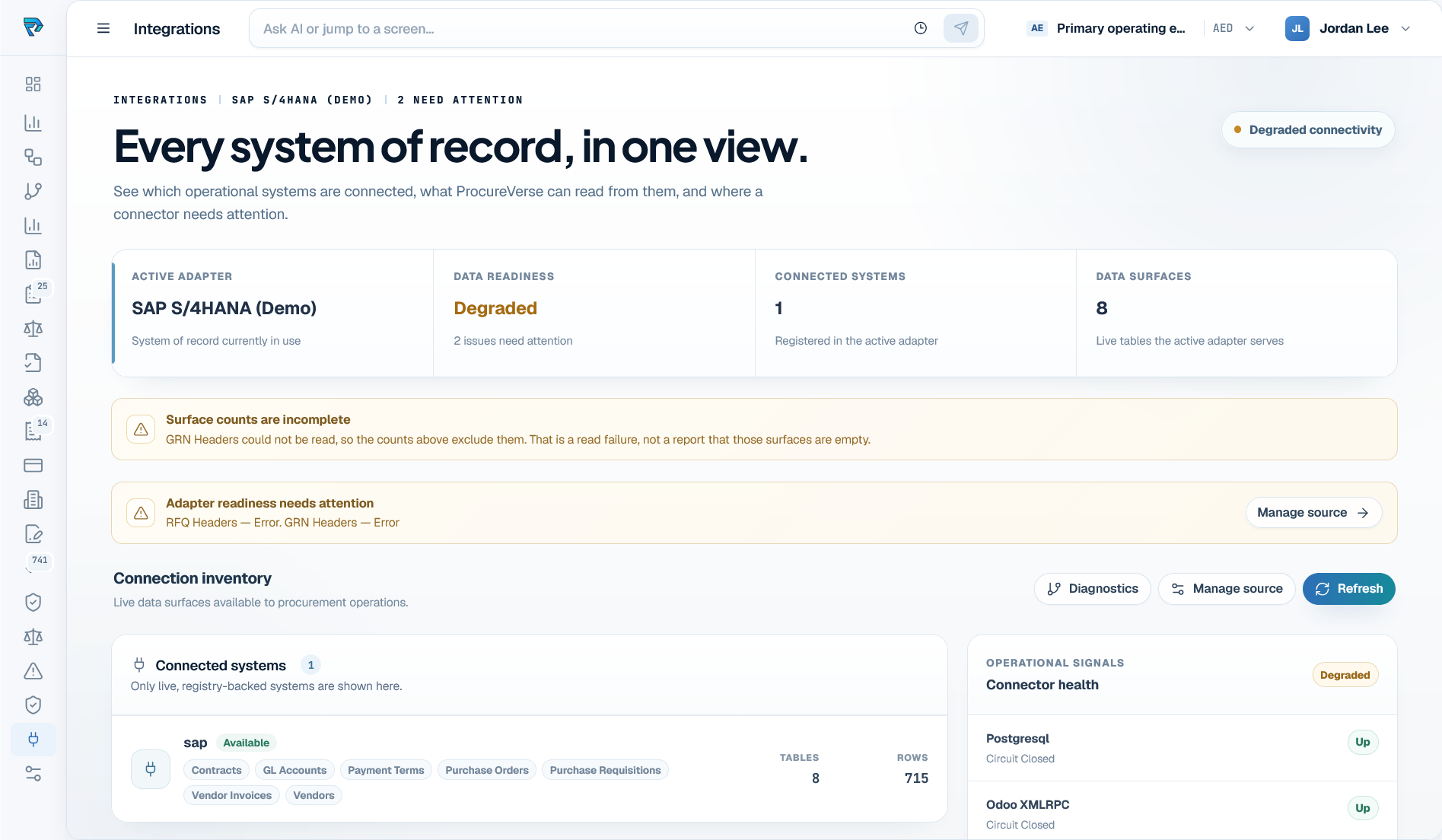
Integration visibility keeps ERP source identity, data readiness, available records, and connector health visible before connected data supports operational work.

  • See which ERP adapter and data surfaces are active.
  • Distinguish connector failure from an empty business result.
  • Qualify source access and readiness before agents rely on the data.
Review the integration model
app.procureverse.ai/integrations
ProcureVerse integrations overview showing SAP adapter readiness and connector health
Shared record, clear ownership

Everyone sees the same work. Each person owns a different decision.

Context travels through the workflow while responsibility stays with the person or team authorized to act.

Shared procurement record

Requester

Confirm the need

Need and account context are complete.

Buyer

Review the options

Supplier options and commercial context are compared.

Approver

Authorize the decision

Budget, policy, and approval context are reviewed.

Finance

Resolve or release

Exceptions are resolved before payment readiness.

Audit

Review the evidence

Source, decisions, overrides, and outcome remain reviewable.

The request, records, policy checks, approvals, exceptions, and outcome remain connected throughout the handoff.
More operating use cases

Extend the same governed model across procurement work.

These scenarios use the same connected records, policy boundaries, human checkpoints, and evidence model.

Supplier onboarding & KYC

Coordinate documentation, screening, approvals, and supplier readiness in one governed record.

Contract lifecycle

Connect agreements, obligations, amendments, expiry, and renewal activity to purchasing work.

Budget control

Bring available budget and the applicable approval band into the decision before work proceeds.

Spend analytics

Review category, department, supplier, and trend signals from the connected operating estate.

Supplier performance

Review supplier records, risk, compliance, contracts, transactions, and performance in context.

Audit & governance

Keep agent actions, human decisions, policy checks, and linked records available for review.

Make the use case concrete

Bring one workflow your team wants to improve.

We will map the people, records, policy checks, approvals, and ERP context involved, then show how ProcureVerse would support the work.